-
FREE PRODUCTS, SPECIAL OFFERS & SUBSCRIPTIONFind something worth grabbingExplore our free releases, check out current discounts, or join Eggy All Access from $14.99 a month or choose annual billing. Both options give you the same full access to all included current and future games, styles and products while your membership remains active.
-
Welcome to the Eggy ForumsNews, support, bug reports, feedback and community discussion for everything Eggy.Eggy News & Announcements Official releases, product updates, promotions, competitions and important Eggy news.General Discussion General community discussion, casual conversation and everyday topics across Eggy.Add-on Support Installation, configuration, upgrade and general support for Eggy products.Bug Reports Report reproducible bugs, errors and unexpected behaviour that needs investigating.Need support? Please include the product name and version, your XenForo version, what happened, and any relevant screenshots or server error logs. Providing clear details helps us investigate issues much faster.
You are using an out of date browser. It may not display this or other websites correctly.
You should upgrade or use an alternative browser.
You should upgrade or use an alternative browser.
Resolved Eggy Seo
- Thread starter Alfre_DGR
- Start date

- Joined
- Aug 1, 2026
- Messages
- 396
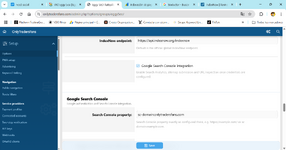
Thanks for the screenshots. The Google connection appears to be reaching the API, but the Search Console property looks to be configured in the wrong format.
If your Search Console property is a Domain property, please enter it exactly as:
If it is a URL prefix property, enter the full property exactly as it appears in Search Console, for example:
Please also make sure the service account email from your Google JSON file has been added under Search Console → Settings → Users and permissions for that property.
Once those are corrected, try the connection and URL inspection again.
For the IndexNow issue, please send me a screenshot of the exact IndexNow error as well so I can check that separately.
If your Search Console property is a Domain property, please enter it exactly as:
sc-domain:onlytradersfans.comIf it is a URL prefix property, enter the full property exactly as it appears in Search Console, for example:
https://onlytradersfans.com/Please also make sure the service account email from your Google JSON file has been added under Search Console → Settings → Users and permissions for that property.
Once those are corrected, try the connection and URL inspection again.
For the IndexNow issue, please send me a screenshot of the exact IndexNow error as well so I can check that separately.
- Joined
- Aug 19, 2026
- Messages
- 6
- Thread Author
- #3
Ok So, does this plugin handle sending pages to Google for indexing more quickly? I’m not sure what else I need to configure—I’m a bit lost, and I’ve always struggled with indexing issues. Could you help me set it up or get it running? I also have another plugin called IndexNow; should I keep that, or does this plugin handle the same task? https://xenforo.com/community/resources/indexnow.8631/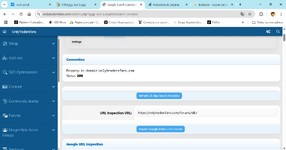
- Joined
- Aug 1, 2026
- Messages
- 396
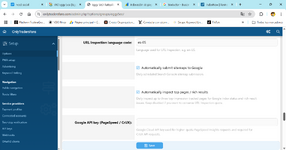
Yep, your Google Search Console connection is working now as shown by the 200 status, so that part is correctly configured.
Eggy SEO Autopilot does help Google discover your content by automatically submitting your sitemaps to Google Search Console. It also monitors your tracked URLs through the Google URL Inspection API. Google does not provide an API that lets add ons simply force normal pages into the index, so sitemap submission and making sure Google can properly crawl the pages is the correct approach. Indexing itself is still ultimately decided by Google.
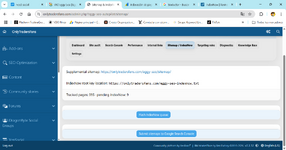
Your screenshots show 595 tracked pages and automatic sitemap submission is enabled, so you already have the main Google side configured correctly.
IndexNow is slightly different. Eggy SEO Autopilot already includes its own IndexNow integration and queue, which is what you can see under Sitemap / IndexNow with 9 URLs currently pending. IndexNow sends changed URLs to search engines that support the IndexNow protocol. Google currently does not use IndexNow, so it does not replace the Google Search Console integration.
Because SEO Autopilot already handles IndexNow itself, you should not need the separate IndexNow add on as well. Running both would potentially just result in the same URLs being submitted twice, so I would recommend using the SEO Autopilot implementation and disabling the separate add on once you have confirmed the queue is submitting successfully.
The blank Google API key shown in your other screenshot is only used for PageSpeed and CrUX performance data, so it is not required for your Search Console connection or sitemap submissions.
From the screenshots you have sent, your setup now looks substantially correct.
Eggy SEO Autopilot does help Google discover your content by automatically submitting your sitemaps to Google Search Console. It also monitors your tracked URLs through the Google URL Inspection API. Google does not provide an API that lets add ons simply force normal pages into the index, so sitemap submission and making sure Google can properly crawl the pages is the correct approach. Indexing itself is still ultimately decided by Google.
Your screenshots show 595 tracked pages and automatic sitemap submission is enabled, so you already have the main Google side configured correctly.
IndexNow is slightly different. Eggy SEO Autopilot already includes its own IndexNow integration and queue, which is what you can see under Sitemap / IndexNow with 9 URLs currently pending. IndexNow sends changed URLs to search engines that support the IndexNow protocol. Google currently does not use IndexNow, so it does not replace the Google Search Console integration.
Because SEO Autopilot already handles IndexNow itself, you should not need the separate IndexNow add on as well. Running both would potentially just result in the same URLs being submitted twice, so I would recommend using the SEO Autopilot implementation and disabling the separate add on once you have confirmed the queue is submitting successfully.
The blank Google API key shown in your other screenshot is only used for PageSpeed and CrUX performance data, so it is not required for your Search Console connection or sitemap submissions.
From the screenshots you have sent, your setup now looks substantially correct.
- Joined
- Aug 19, 2026
- Messages
- 6
- Thread Author
- #5
What else do you recommend I enable in your plugin? My site functions as both a forum and an informational resource, and I want it to be visible everywhere, as no one has registered in two months. I’m getting a bit desperate.
- Joined
- Aug 1, 2026
- Messages
- 396
I would make sure Search Console integration, sitemap submission, the site audit and internal link tools are all enabled and working correctly. IndexNow can also be left enabled for search engines that support it.
Beyond that I would not recommend switching everything on just for the sake of it. SEO can help visibility and discovery, but it cannot guarantee registrations, and results usually take time depending on your content, competition and how Google is currently treating the site.
Beyond that I would not recommend switching everything on just for the sake of it. SEO can help visibility and discovery, but it cannot guarantee registrations, and results usually take time depending on your content, competition and how Google is currently treating the site.
- Joined
- Aug 1, 2026
- Messages
- 396
ACP → Groups & permissions → Administrators
From there, add or edit the administrator account and only tick the specific admin permissions you want that person to have.
They do not need to be a Super Administrator unless you specifically want them to have unrestricted ACP access.
So for example, if they only need access to certain areas, just give them those individual permissions and leave everything else disabled.
From there, add or edit the administrator account and only tick the specific admin permissions you want that person to have.
They do not need to be a Super Administrator unless you specifically want them to have unrestricted ACP access.
So for example, if they only need access to certain areas, just give them those individual permissions and leave everything else disabled.

- Joined
- Aug 1, 2026
- Messages
- 1
I mean, I have a regular administrator account, but it can't see the Eggy panel.
if you already have a normal administrator account, a Super Administrator should be able to grant that account access to the Eggy SEO admin permission specifically. You shouldn’t need full Super Administrator access just to use the Eggy SEO panel
- Joined
- Aug 1, 2026
- Messages
- 396
Go to: https://yourforum.com/admin.php?admins/
That is the Administrators section in XenForo, where ACP administrator accounts are created and managed.
Click the administrator account you want to edit, then change their Administrator permissions. A Super Administrator can choose which ACP areas and add-on permissions that administrator can access, including Eggy SEO.
They do not need to be made a Super Administrator. Just grant the Eggy SEO permission to the existing administrator account.
That is the Administrators section in XenForo, where ACP administrator accounts are created and managed.
Click the administrator account you want to edit, then change their Administrator permissions. A Super Administrator can choose which ACP areas and add-on permissions that administrator can access, including Eggy SEO.
They do not need to be made a Super Administrator. Just grant the Eggy SEO permission to the existing administrator account.
- Joined
- Aug 1, 2026
- Messages
- 396
Thanks for checking that.View attachment 450
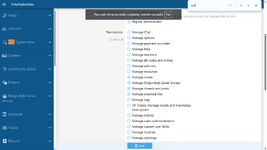
I dont see the permission eggy seo
At the moment Eggy SEO does not have its own separate administrator permission. As it is a free add-on, it was originally designed on the assumption that the site owner installing it would already have the permissions needed to access and manage it.
I can see the benefit of allowing a regular administrator to be given access specifically to Eggy SEO without giving them broader ACP permissions though.
I’ll add support for this in an update during the week so a Super Administrator can grant access to Eggy SEO from the normal administrator permissions screen.
I do have quite a large workload to get through at the moment, but I’ll make some time for this and get an update out when I can this week.